Buddy Script: A Handwritten Font for Campaigns
The deadline was tight. We were launching a new digital planner series, and the creative brief called for something that felt personal yet polished. The initial mockups looked stiff; standard sans serif headers felt too corporate for a product designed to help people organize their lives with joy. I needed a typeface that could bridge the gap between professional design assets and the warmth of a handwritten note. That is when I pulled Buddy Script into the workflow.
As a marketing designer, you often find yourself hunting for a specific mood in your library of fonts. You need something that stops the scroll on Instagram but remains legible on a tiny mobile screen. Buddy Script immediately stood out as a neat, cute, and minimal script. It didn't feel like a generic decorative font; it felt like a tool built for modern communication. In this review, I want to walk you through how this specific typeface performs in real campaign scenarios, from YouTube thumbnails to email banners, and why it might be the missing piece in your brand identity toolkit.
First Impressions: Visual Personality and Mood
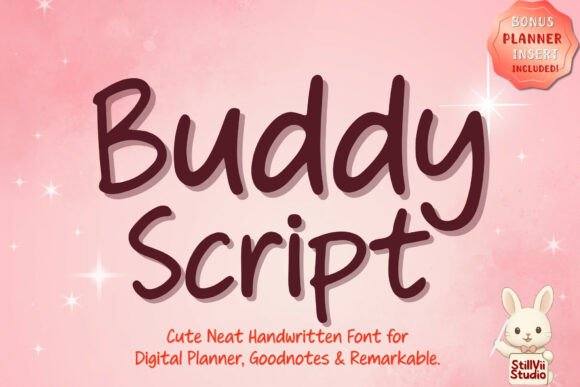
When you first load Buddy Script into your design software, the visual impact is immediate. It sits comfortably within the category of a premium font, offering strokes that are perfectly legible without sacrificing character. Unlike many script fonts that prioritize flair over function, Buddy Script maintains a clean structure. The loops are controlled, and the spacing feels intentional rather than chaotic.
In the context of our digital planner campaign, this "neatness" was crucial. We wanted to convey organization, not chaos. The font's personality is approachable and friendly, making it ideal for brands that want to sound like a helpful friend rather than a distant corporation. When used as a display font for headlines, it instantly softens the tone of the message. It transforms a dry announcement into an invitation. This is the kind of creative font that works exceptionally well for lifestyle brands, educational content creators, and small business owners who rely on building a community around their work.
Testing Readability Across Digital Channels
The true test of any marketing asset is how it holds up across different devices and platforms. I ran Buddy Script through a rigorous check on mobile previews, desktop layouts, and social media feeds. One of the biggest challenges with script typography is readability on small screens. Many handwritten fonts become illegible blobs when shrunk down for a Pinterest pin or a story overlay.
Buddy Script handled these constraints surprisingly well. Because the strokes are minimal and the letterforms are distinct, it remained clear even at smaller sizes. For our Instagram Reels covers, we used the font for short callouts like "New Drop" or "Sale Live." The text popped against both dark and light backgrounds, ensuring that the message was understood before the video even started playing. This clarity is vital for fast-scrolling feeds where you have less than a second to capture attention.
However, there are limits. While Buddy Script excels as a headline or a label, it is not designed for long paragraphs. Attempting to use it for body copy in an email newsletter or a dense landing page would hurt your conversion rates by reducing readability. It is best deployed as a supporting typography element—used for emphasis, titles, and key takeaways—while pairing it with a robust sans serif font for the bulk of the information.
Campaign Applications: From Thumbnails to Ads
To understand the versatility of Buddy Script, let's look at how it performed in specific campaign elements during our launch week. First, we tackled the YouTube thumbnail set. Thumbnails need high contrast and instant recognition. We paired Buddy Script with a bold, geometric sans serif. The script added a human touch to the clickbait-style headline, making the video feel more authentic and less manufactured. The result was a balanced visual hierarchy where the script drew the eye to the emotional hook of the title.
Next, we moved to the email promotion. The subject line was plain text, but the header image inside the email featured Buddy Script prominently. We used it for a "Welcome Inside" greeting. Because the font mimics natural handwriting, it created a sense of intimacy, as if the recipient had received a personal note. This subtle psychological trigger can significantly boost open rates and engagement, provided the rest of the email design supports that warm aesthetic.
We also tested it for a webinar banner. The event was about "Creative Study Notes," so the font choice had to align with the topic. Using Buddy Script for the event title reinforced the theme of analog creativity meeting digital tools. It worked seamlessly as a logo-style text element, giving the webinar a branded feel without needing a complex graphic illustration. For social media graphics, specifically quote cards for Instagram, the font allowed us to create minimalist designs that focused entirely on the message, letting the typography do the heavy lifting.
Strategic Pairing and Design Systems
No font exists in a vacuum. To get the most out of Buddy Script, you need a solid font pairing strategy. In our workflow, we found that the font shines brightest when paired with a clean sans serif font. The contrast between the organic curves of the script and the rigid lines of a modern sans serif creates a dynamic tension that keeps the design interesting. This combination is a staple in modern typography systems used for editorial design and web design alike.
If you are aiming for a more traditional or elegant look, a classic serif font can also work, though the playful nature of Buddy Script might clash with overly formal serifs. The goal is to maintain a cohesive brand identity. If your brand voice is serious and corporate, Buddy Script might feel out of place. However, for brands focusing on wellness, education, creativity, or lifestyle, it fits right in. It acts as a versatile design asset that can elevate simple layouts into professional-grade visuals.
When integrating this into a larger system, consider using it for decorative titles, campaign labels, and logo design elements. Avoid using it for data-heavy charts or legal disclaimers. Its strength lies in its ability to convey emotion and style quickly. By restricting its use to specific roles within your layout, you ensure that it remains impactful rather than overwhelming.
Licensing, Formats, and Practical Considerations
Before you commit to using Buddy Script in a client campaign or for your own merchandise, there are practical details to verify. As with any commercial font, you must check the licensing terms. Ensure that the license covers your intended use, whether that is for digital ads, print materials, packaging design, or embedding in web projects. Some licenses restrict usage on certain platforms or require additional fees for large audiences.
Check the included file formats. For digital campaigns, you will likely need OTF or TTF files for desktop applications and WOFF/WOFF2 for web integration. Verify if the font includes alternates, ligatures, or multiple weights. These features can add depth to your design, allowing you to create variations of the same word without losing consistency. Additionally, confirm multilingual support if your audience spans different regions. A font that only supports basic Latin characters might limit your global reach.
Buddy Script represents a shift towards fonts that balance aesthetics with utility. It proves that a handwritten font can be both cute and functional, serving as a powerful tool for marketers who need to stand out in a crowded digital space. Whether you are designing a product teaser, a course launch, or a seasonal sale, having a reliable script like this in your arsenal ensures your visuals communicate clearly and connect emotionally with your audience.