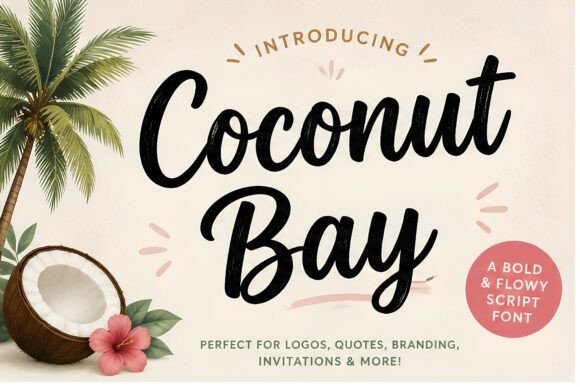
Coconut Bay: A Tropical Script Font for Web Design
In the crowded landscape of digital experiences, a brand's visual voice often hinges on a single decision: typography. As designers, we constantly search for typefaces that balance personality with functionality. Coconut Bay emerges as a standout choice for those aiming to infuse their projects with the effortless energy of summer vacations and coastal adventures. This bold, cheerful handwritten script font is not merely decorative; it is a strategic asset for web designers, UI creators, and digital product managers looking to craft immersive online identities.
The Visual Language of Coconut Bay
At its core, Coconut Bay captures the organic flow of natural brush strokes. Unlike rigid geometric scripts, this typeface features smooth curves and relaxed island vibes that mimic the movement of waves or palm fronds. For a web designer, these characteristics translate into immediate emotional resonance. When a user lands on a page featuring this font, they instantly perceive warmth, approachability, and creativity.
The font's design avoids the overly ornate flourishes that can clutter modern interfaces. Instead, it maintains a clean structure that ensures legibility even at larger sizes. This makes it an excellent candidate for hero sections, where the goal is to capture attention within seconds. The "handwritten" aesthetic of Coconut Bay suggests authenticity, a trait highly valued in personal branding, coaching websites, and boutique e-commerce stores.
Strategic Placement in Digital Layouts
While Coconut Bay is visually striking, its effectiveness depends on where you place it within your layout hierarchy. It shines brightest as a display font for primary headlines, logo text, and short, punchy phrases. In a landing page context, using this script for the main value proposition can break the monotony of standard sans-serif headers, guiding the user's eye immediately to the most critical message.
- Hero Sections: Pair the font with high-quality imagery of travel destinations, wellness retreats, or artisanal products to create an inviting atmosphere.
- Call-to-Action Buttons: While body text requires clarity, CTA buttons benefit from personality. Using Coconut Bay for button text like "Start Your Journey" or "Shop the Collection" adds a human touch that can boost conversion rates.
- Section Headings: Use it sparingly for sub-sections to maintain rhythm without overwhelming the reader.
- Digital Ads and Banners: Its bold nature ensures it remains readable even in compressed social media graphics or retargeting ads.
However, restraint is key. Because Coconut Bay is a script font, it should generally be avoided for long paragraphs or dense information blocks. The irregular letter spacing and fluid lines can hinder scanning behavior if used for extended reading. Instead, reserve it for moments where you want to pause the user and evoke a feeling.
Enhancing Readability and User Experience
One of the primary concerns when integrating a creative font into a responsive website is readability across devices. Coconut Bay performs admirably on desktop screens, but mobile optimization requires careful consideration. On smaller viewports, ensure that the font size is sufficiently large to prevent the brush strokes from blurring together. A minimum of 32px to 40px is often recommended for mobile headlines to maintain clarity.
Contrast plays a vital role in the success of this typeface. When placing Coconut Bay over image overlays, always use a subtle shadow or a semi-transparent background layer to separate the text from the busy visual elements behind it. Conversely, on light backgrounds, the dark, bold strokes of the font provide excellent contrast, ensuring accessibility standards are met. For dark mode designs, consider using a slightly lighter weight or adjusting the opacity to avoid visual vibration against deep black backgrounds.
Mastering Font Pairing for Cohesive Brand Identity
No script font exists in a vacuum. To create a professional and cohesive brand identity, Coconut Bay must be paired with complementary typefaces. The goal is to establish a clear visual hierarchy where the script acts as the expressive lead, while the supporting fonts handle the informational heavy lifting.
A classic and highly effective pairing strategy involves combining Coconut Bay with a clean, neutral sans serif font. Fonts like Helvetica, Roboto, or Open Sans provide a structured grid that grounds the whimsical nature of the script. This combination works exceptionally well for SaaS founders who want to appear innovative yet reliable, or for online store owners selling lifestyle products. The sans serif handles the navigation menus, body copy, and footnotes, ensuring the user can easily consume content.
Alternatively, for a more editorial or sophisticated look, consider pairing it with a refined serif font. This juxtaposition creates a sense of elegance and tradition, suitable for luxury travel blogs, wedding planning services, or high-end fashion boutiques. The serif font adds a layer of authority, while Coconut Bay injects the necessary warmth and personality.
Technical Considerations for Web Implementation
From a technical standpoint, the versatility of Coconut Bay extends to its file formats and licensing options. For web deployment, ensure you have access to optimized webfont formats such as WOFF2 and WOFF to guarantee fast loading times. Slow-loading assets can negatively impact Core Web Vitals, which directly affects search engine rankings and user retention.
Check the included styles and weights carefully. Does the font family offer alternates or ligatures? These small details can add unique character to specific letters, allowing for custom logo treatments within the browser. Additionally, verify multilingual support if your target audience spans different regions. A truly global brand needs a typeface that renders correctly across various character sets.
Licensing is another critical aspect for digital product creators. Whether you are building a client website, a personal portfolio, or a commercial online store, ensure you have the appropriate commercial font license. Using a premium font without the correct rights can lead to legal complications and damage your professional reputation. Look for licenses that cover unlimited web usage, app integration, and print materials if you plan to extend the brand identity beyond the screen.
Crafting Memorable Digital Experiences
Ultimately, the choice of Coconut Bay is about more than just aesthetics; it is about storytelling. In a digital world dominated by uniform grids and robotic interactions, a handwritten script offers a moment of connection. It signals that there is a human behind the screen, someone passionate about their craft.
Whether you are designing a course sales page for a life coach, a portfolio for a creative freelancer, or a landing page for a summer campaign, this font provides the perfect tonal anchor. By leveraging its bold strokes and cheerful personality, you can guide users through your site with a sense of joy and discovery. When paired correctly and implemented with attention to usability, Coconut Bay transforms a standard website into a vibrant, engaging destination that users remember long after they leave the page.